
Declarative Device Management (DDM) is Apple’s newer way of managing iPhone, iPad, Mac, Apple TV, Apple Vision Pro, and other Apple devices through an MDM solution such as Microsoft Intune. It was introduced in June 2021 at the Apple WWDC 2021 event with iOS 15.
With traditional Mobile Device Management (MDM), the management server typically sends commands to a device and then checks back to confirm whether those commands were completed successfully. Declarative Device Management (DDM) works differently. The management service, such as Microsoft Intune, declares the desired state of the device, and the device takes responsibility for applying the required settings and continuously maintaining that state.
The easiest way to understand DDM is:
Traditional MDM tells the device what action to perform.
DDM tells the device what state it should be in.
Apple describes Declarative Device Management (DDM) as an extension of the existing device management protocol rather than a completely separate enrollment or management system. This means organizations do not need to replace their existing MDM enrollment to use DDM. Instead, DDM builds on the existing management framework by providing a more autonomous and responsive way to manage Apple devices.
Apple has deprecated the legacy MDM-based software update workflow in favor of Declarative Device Management (DDM). To align with this change, Microsoft Intune will also end support for MDM-based Apple software update policies, and Microsoft recommends using DDM to manage and enforce software updates on supported Apple devices.
Traditional MDM
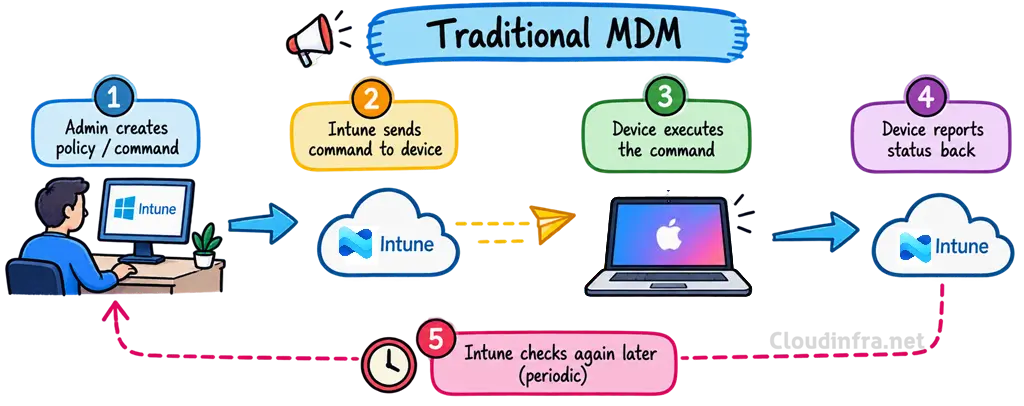
Traditional Mobile Device Management (MDM) uses a command-based approach where the MDM server, such as Microsoft Intune, sends specific commands or configuration instructions to the managed device. The device receives the command, performs the required action, and then reports its status back to Intune. Intune may need to check the device again later or send additional commands if further action is required. This results in more communication between the server and the device, with the management server remaining actively involved throughout the process.
Declarative Device Management (DDM)
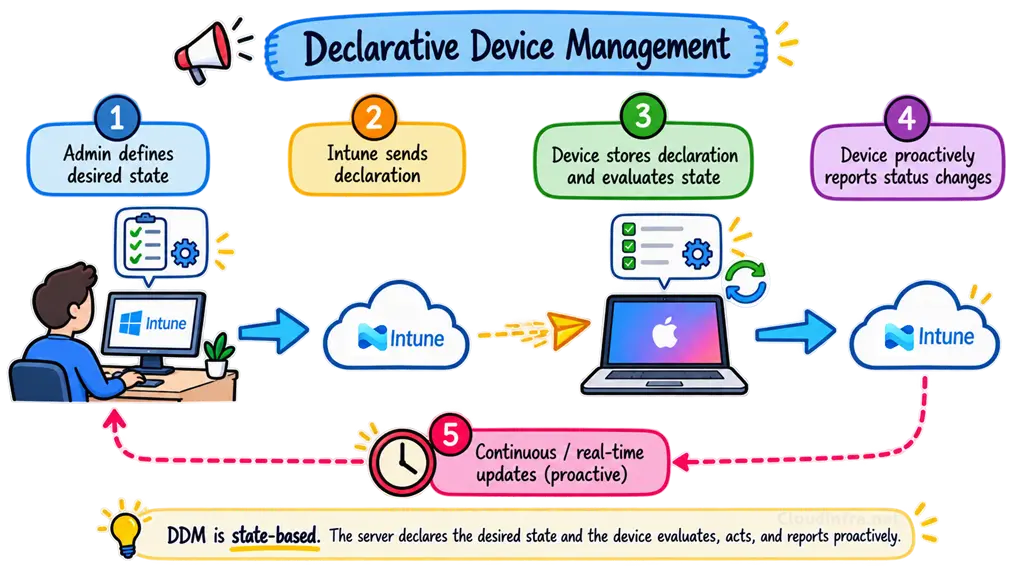
Declarative Device Management (DDM) allows an administrator to define the state that a managed Apple device should be in, rather than continually sending individual commands for the device to perform. For example, you can create a DDM policy that defines the desired state of the device. The device stores this declaration locally and takes responsibility for applying the required changes and maintaining that state.
Below is an example of a desired state, where we simply tell the device which macOS version it should be running and the deadline by which it must achieve that state. The device then takes responsibility for completing the update and reaching the required state.
Desired state
──────────────────────────────
macOS version = required version
Deadline = 10 September
──────────────────────────────
Mac then manages much more of the update process locally. It can download the update, prepare it, notify the user, enforce the deadline, and report changes in its update status back to the management service. The server defines the desired state, and the device works to achieve and maintain that state.
Comparison of Traditional MDM and DDM
The table below shows the main differences between a traditional MDM and declarative device management (DDM).
| Area | Traditional MDM | DDM |
|---|---|---|
| Management approach | Command-based | Desired-state / declarative |
| How it works | Intune tells the device what action to perform | Intune tells the device what state it should achieve |
| Example | “Install this software update” | “Device must be on macOS version X by this deadline” |
| Device behaviour | Device executes commands received from Intune | Device evaluates its own state and determines what action is required |
| Server involvement | Intune remains more involved throughout the process | More management logic runs locally on the device |
| Communication | More command-and-response communication | Fewer management round trips |
| Status reporting | Intune may need to check the device periodically | Device can proactively report relevant status changes via the Status Channel |
| Policy evaluation | Primarily driven by the MDM server | Device can evaluate declarations locally |
| Maintaining configuration | Additional commands may be required when changes occur | Device works to maintain the declared state |
| Responsiveness | Can depend on check-in and command processing | More responsive because the device can react locally |
| Scalability | More server-device communication at scale | Designed to improve scalability and efficiency |
| Management model | Server-driven | Device-driven |
| Apple direction | Existing MDM model and still widely used | Apple’s modern device-management architecture |
| A simple way to remember | Intune tells the device what to do | Intune tells the device what the end result should be |
Key Components of Declarative Device Management (DDM)
Declarative Device Management (DDM) is built around three core components: Declarations, the Status Channel, and Extensibility. Together, these components enable devices to apply and maintain their desired state more autonomously. Let’s take a closer look at what each component means and how it works.
- Declarations: These are payloads sent by the MDM service that describe the configuration, assets, activations, or management state the device should apply and maintain.
- Status Channel: A structured reporting mechanism that lets the device proactively send subscribed status information, state changes, and declaration results back to the MDM service.
- Extensibility: A capability-negotiation mechanism where the device and MDM service advertise supported declaration types, status items, and DDM protocol features so each side knows what functionality is available.

Declarations
Declarations are payloads defined by the management service, such as Microsoft Intune, and assigned to managed Apple devices. You can think of a declaration as similar to a configuration profile or policy that defines the desired state you want the device to achieve and maintain. There are four types of declarations.
| Declaration | Purpose | Example |
|---|---|---|
| Configuration | Defines the actual setting or policy | Software update settings, passcode settings, accounts |
| Asset | Supplies additional data referenced by configurations | Certificate, identity, credential, external data |
| Activation | Determines which configurations become active and can apply conditions | Apply a configuration only to a particular device type |
| Management | Provides management metadata | Organization details, properties, server capabilities |
Below is an example of how a declaration JSON schema looks. There are four main keys when defining a declaration: Type, Identifier, ServerToken, and Payload. These keys tell the device what the declaration does, uniquely identify it, track changes to it, and define the actual settings that should be applied.
{
  "Type": "com.apple.activation.simple",
  "Identifier": "com.example.activation.standard",
  "ServerToken": "revision-1",
  "Payload": { ... }
}- Type: Specifies the type and purpose of the declaration. It uses a dot-separated string such as com.apple.configuration… to identify the specific configuration, asset, activation, or management declaration being delivered.
- Identifier: A unique string that identifies the declaration on the device. Apple recommends using a UUID, although it is not mandatory. The value must remain the same when updating the same declaration so the device can match the new version with the existing one.
- ServerToken: Identifies a specific revision of the declaration. Whenever the declaration changes, the ServerToken must also change so the device knows that an updated version is available. It can be a UUID, counter, or another unique string and does not have to be a UUID/GUID.
- Payload: Contains the actual settings or data associated with the declaration. The structure of the payload depends on the declaration type and can contain strings, numbers, Boolean values, arrays, and dictionaries.
Below is an example of a Software Update Configuration declaration payload that defines software update settings on a managed Apple device.
{
  "Type": "com.apple.configuration.softwareupdate.settings",
  "Identifier": "com.cloudinfra.softwareupdate.settings",
  "ServerToken": "2",
  "Payload": {
    "AutomaticActions": {
      "Download": "AlwaysOn",
      "InstallOSUpdates": "AlwaysOn",
      "InstallSecurityUpdate": "AlwaysOn"
    }
  }
}
Status
The Status Channel is the feedback mechanism. Rather than the MDM server repeatedly asking, “What is your status now?”, the device can proactively send a status report when something relevant changes. The management service can subscribe to specific status items so it receives the information it actually needs.
For example, the management service can subscribe to operating-system information:
{
  "Type": "com.apple.configuration.management.status-subscriptions",
  "Identifier": "com.example.status.subscription",
  "ServerToken": "revision-1",
  "Payload": {
    "StatusItems": [
      {
        "Name": "device.operating-system.version"
      }
    ]
  }
}
Apple devices can then report the value in a hierarchical JSON status object:
{
  "device": {
    "operating-system": {
      "version": "27.0"
    }
  }
}
Extensibility
Extensibility allows the device and the MDM service to advertise which DDM features they support. This is important because Apple can introduce new declarations and status capabilities without requiring every device and every MDM platform to upgrade at exactly the same time. A device reports its capabilities through the management.client-capabilities status item. An example looks like this:
{
  "management": {
    "client-capabilities": {
      "supported-payloads": {
        "declarations": {
          "activations": [
            "com.apple.activation.simple"
          ],
          "configurations": [
            "com.apple.configuration.softwareupdate.settings"
          ]
        },
        "status-items": [
          "device.operating-system.version",
          "management.declarations"
        ]
      },
      "supported-versions": [
        "1.0.0"
      ]
    }
  }
}
Declarative Device Management Platform Support
The table below describes the minimum OS versions where Apple’s DDM framework became available. Individual DDM configurations and Microsoft Intune features may require newer OS versions. For example, declarative software update enforcement requires iOS/iPadOS 17 or later and macOS 14 or later, while some newer DDM settings require even later releases.
| Platform | Supported OS Versions |
|---|---|
| iPhone | iOS 15 |
| iPad | iPadOS 15 |
| Mac | macOS 13 Ventura |
| Apple TV | tvOS 16 |
| Apple Vision Pro | visionOS 1.1 |
| Apple Watch | watchOS 10 |
Declarative Device Management (DDM) Workflow
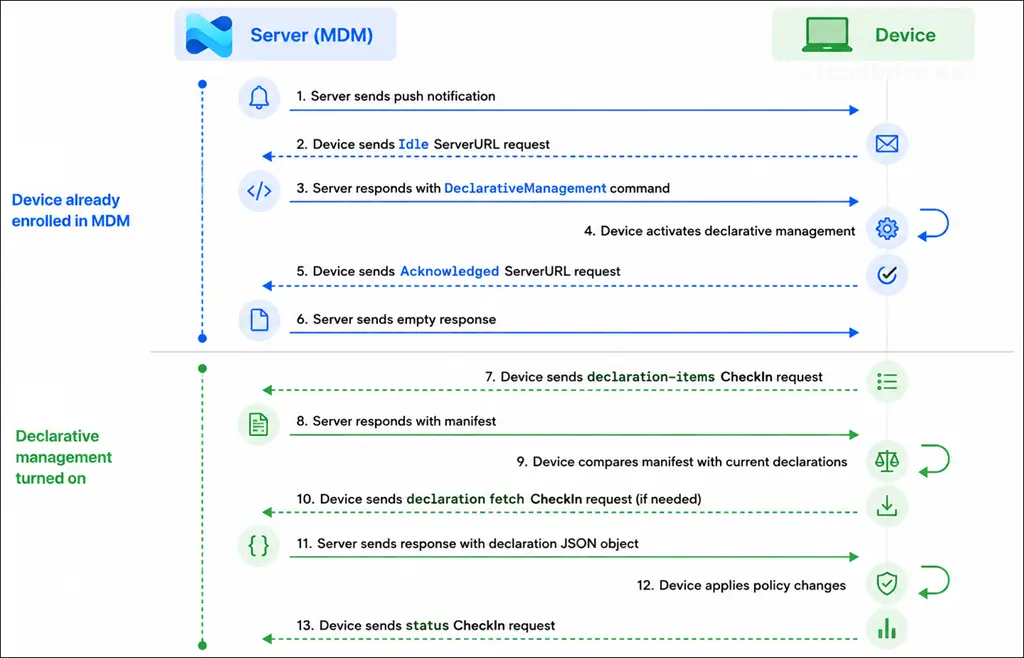
The diagram below shows how Declarative Device Management (DDM) is activated and how communication occurs between Microsoft Intune and an Apple device. The device must first be enrolled in MDM, after which Intune enables declarative management through the existing MDM communication channel. Once DDM is active, the device retrieves the declaration manifest, downloads any required declarations, applies the required configuration locally, and proactively reports status changes back to Intune.
Enabling Declarative Device Management (DDM)
There is no separate policy or switch to enable Declarative Device Management (DDM) in Intune. On supported Apple devices, DDM is automatically activated when you assign a policy that uses Apple’s declarative management framework, such as a DDM-based software update policy. Once the device receives the policy, Intune and the device use DDM to apply and maintain the declared configuration.
Once Declarative Device Management (DDM) has been activated on an Apple device, it cannot be directly turned off while the device remains enrolled in MDM. To effectively disable DDM behaviour, remove or unassign the DDM-based policies so the MDM service removes the associated declarations from the device. If the device is completely unenrolled from Intune, Apple removes all declarative management state and declarations from the device.
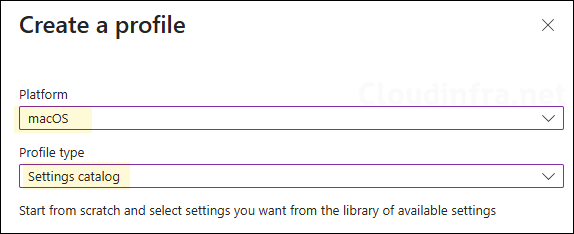
- Go to the Intune admin center > Devices > Configuration > Create > New policy.
- Platform: iOS/iPadOS or macOS, Profile type: Settings catalog.
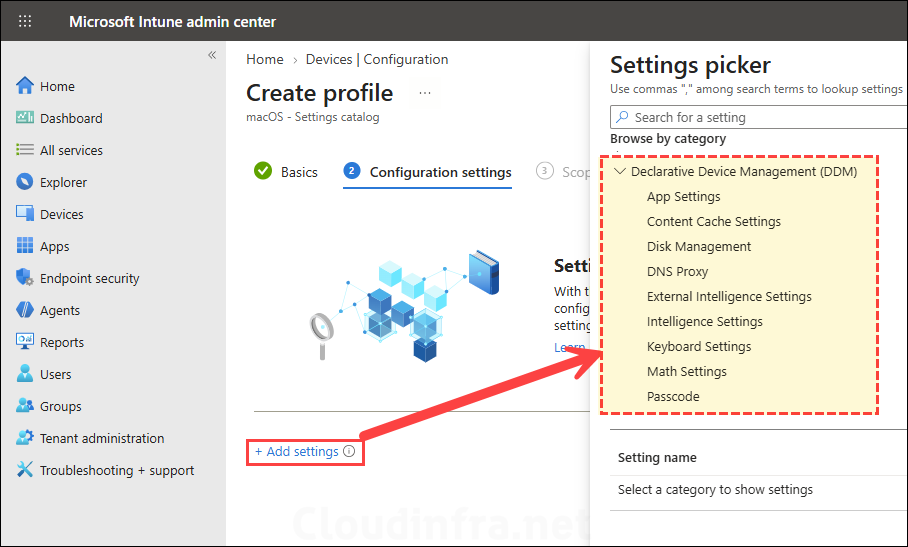
- Click Add settings and browse to Declarative Device Management.
- Select the required DDM settings, for example, Declarative Device Management > Software Update.
- Configure the required values, such as Target OS Version, Target Date Time, or the latest-version enforcement settings.
- Scope tags (optional): A scope tag in Intune is an RBAC label that you assign to resources such as policies, apps, and devices to control which administrators can view and manage them. For more information, see How to use scope tags in Intune.
- Assignments: Assign the policy to Microsoft Entra security groups that include the target macOS devices. As a best practice, start with a small pilot group, and once validated, expand the assignment more broadly. For guidance on assignment strategy, see Intune assignments: User groups vs. device groups.
- Review + create: Review the deployment summary and click Create.
Common Declarative Device Management (DDM) policies
Microsoft is continuously expanding Declarative Device Management (DDM) support in Microsoft Intune. With the August 2026 (2608) Intune service release, DDM support was extended to required Volume Purchase Program (VPP) apps on devices running iOS/iPadOS 17.2 or later and macOS 26 or later. Below are some common use cases for Declarative Device Management.
- Software Update Policies: Enforce the latest OS version or a specific target version by a defined deadline. This is one of the most common DDM use cases for iOS/iPadOS and macOS. Software Update declarative configuration for Apple devices – Apple Support (UK)
- Passcode policies: Configure passcode requirements such as complexity, minimum length, failed attempts, inactivity limits, and reuse restrictions. Intune now recommends the DDM Passcode configuration where supported. Passcode declarative configuration for Apple devices – Apple Support (UK).
- Safari Settings: Control Safari options such as private browsing, JavaScript, pop-ups, cookies, history clearing, fraud warnings, home page, and extensions. Safari extensions management declarative configuration for Apple devices – Apple Support (UK).
- App Settings: Control which apps can launch on supervised iOS/iPadOS devices and which binaries are allowed or blocked on macOS. WWDC26 app management updates – Apple Support (UK).
- Required app deployment: Deploy supported VPP and line-of-business apps using DDM, with improved app delivery and real-time status reporting.
- Restrictions: Configure supported device restrictions, including cloud services, device functionality, security controls, and other platform-specific settings.
- Software update behavior/settings: Control how updates are downloaded, installed, deferred, and enforced on supported devices.
- Audio Accessory Settings: On supported iOS/iPadOS versions, manage temporary accessory pairing and unpairing behaviour through DDM. AudioAccessorySettings | Apple Developer Documentation.
